What 4 Tournaments in the Score Tent Taught Me About Grassroots Football
Four events, three different systems, and one repeating lesson: the quietest score tent is always the sign of the best-run day.
If you've ever volunteered to run the score tent on a tournament weekend, you know it's the nerve centre of the entire event. Every single request lands on your desk:
What pitch am I on? Where can I put my tent? What time's the managers' meeting? Does everyone get a medal? Where's the ref for my fixture? I don't think my score is right. What time is the semi-final?
This is why an event just has to work, and why the most successful events always have the quietest score tents.
Having managed the fixtures across four events, here is what actually happens on the desk, what goes wrong with schedules, and how to survive the weekend.
Phase 1 · 1 Event
The Spreadsheet Era
Our first event ran off a Google Sheet displayed on a clubhouse TV screen.
The Reality
It worked, but having only one screen meant a permanent queue of parents, kids, and coaches huddled around the score tent all day to check standings or ask about results.
The Lesson
Relying on a single point of information creates massive bottlenecks. If people can't see fixtures on their own phones at the touchline, they will come and ask you in person.
Phase 2 · 2 Events
The Complex Software Era
We upgraded to software for the next two events. It got us through, but it was complex to set up and wasn't mobile-responsive.
The Reality
You had to run it off a laptop with cables in the tent, rather than having pitch marshals input scores on their phones. It wasn't fan-friendly, so parents still struggled to find what they needed, keeping stress levels high. Both times, we kept paper scoresheets as a backup.
The Lesson
You need software that is as fast and responsive on mobile as FotMob or Uber, built specifically for fields with low signal. The software should work just as hard as the volunteers.
Phase 3 · 1 Event
Purpose-Built Grassroots Tech
After three events of wrestling with spreadsheets, laptops, and crowds, I built FixtureHub to eliminate all of that in one go. If you're currently weighing up tournament platforms yourself, our Tournify alternative breakdown covers how the two actually differ for UK grassroots football.
We put it to the test at the Dussy Cup (Dussindale & Hellesdon FC), a two-day event. I wasn't even on-site for day one because I was at my sister's wedding, so the committee ran the desk without my help. Forty-eight hours before kickoff, we had to merge two leagues into one age group. A last-minute push meant half that merged league's pitch times didn't publish online on morning one. But because we had paper referee cards as a backup, every ref knew where to be, matches ran on time, and we patched the online view that evening ready for day two.
Made for mobile
This is what did it
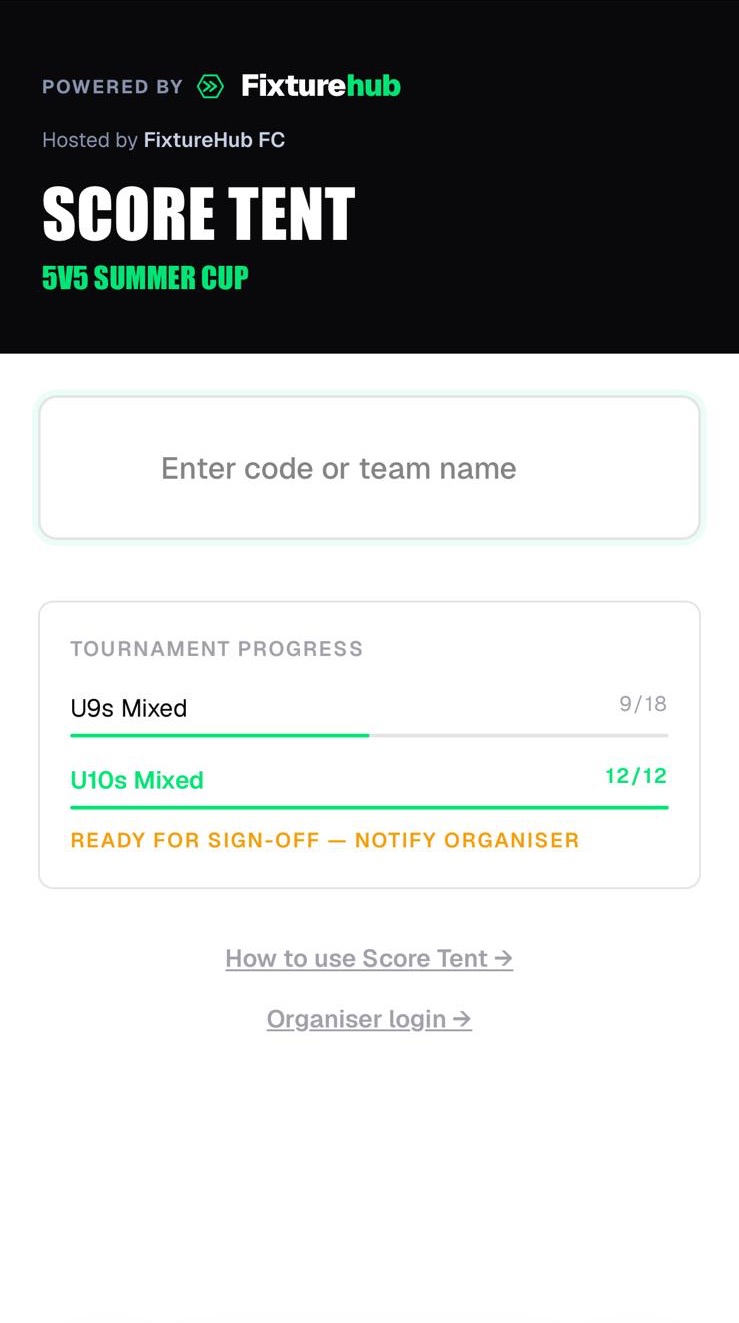
Pitch-Side Scoring
Submit live scores on our mobile score tent.
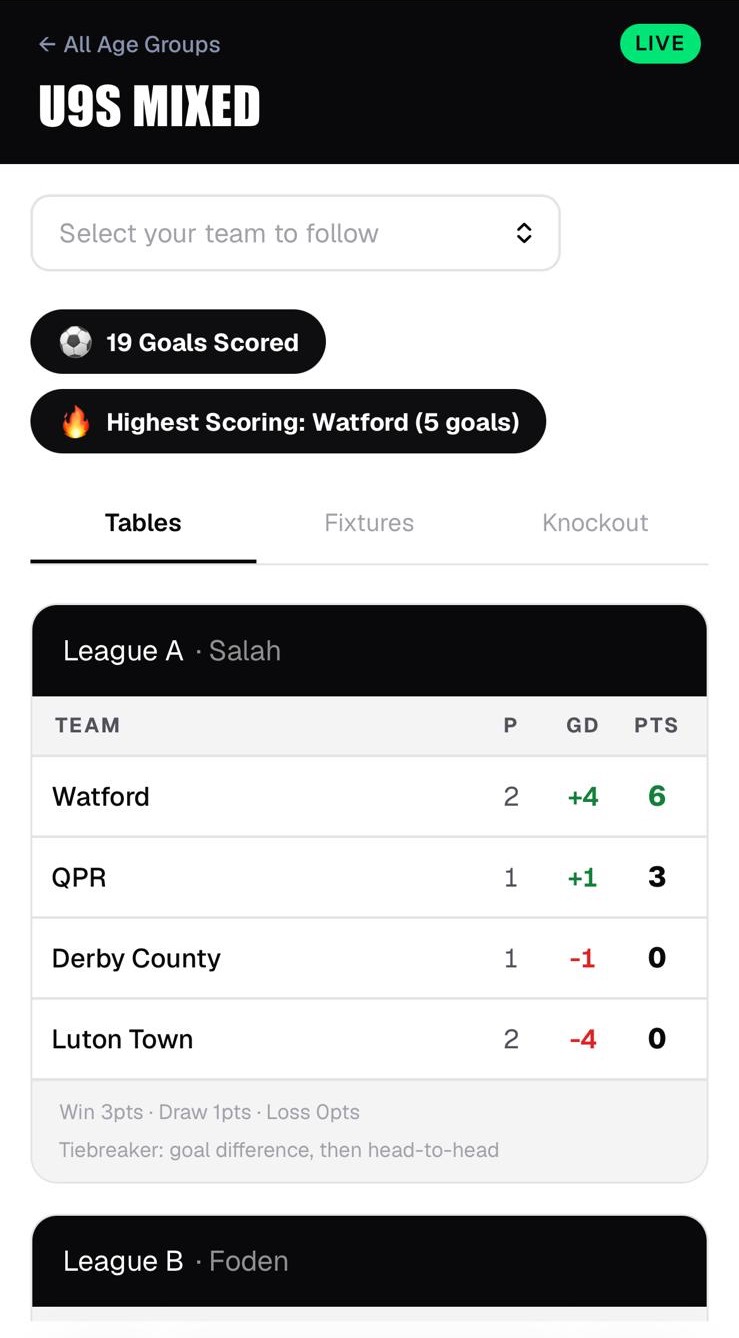
Live Standings
League tables, total goals and highest scorers.
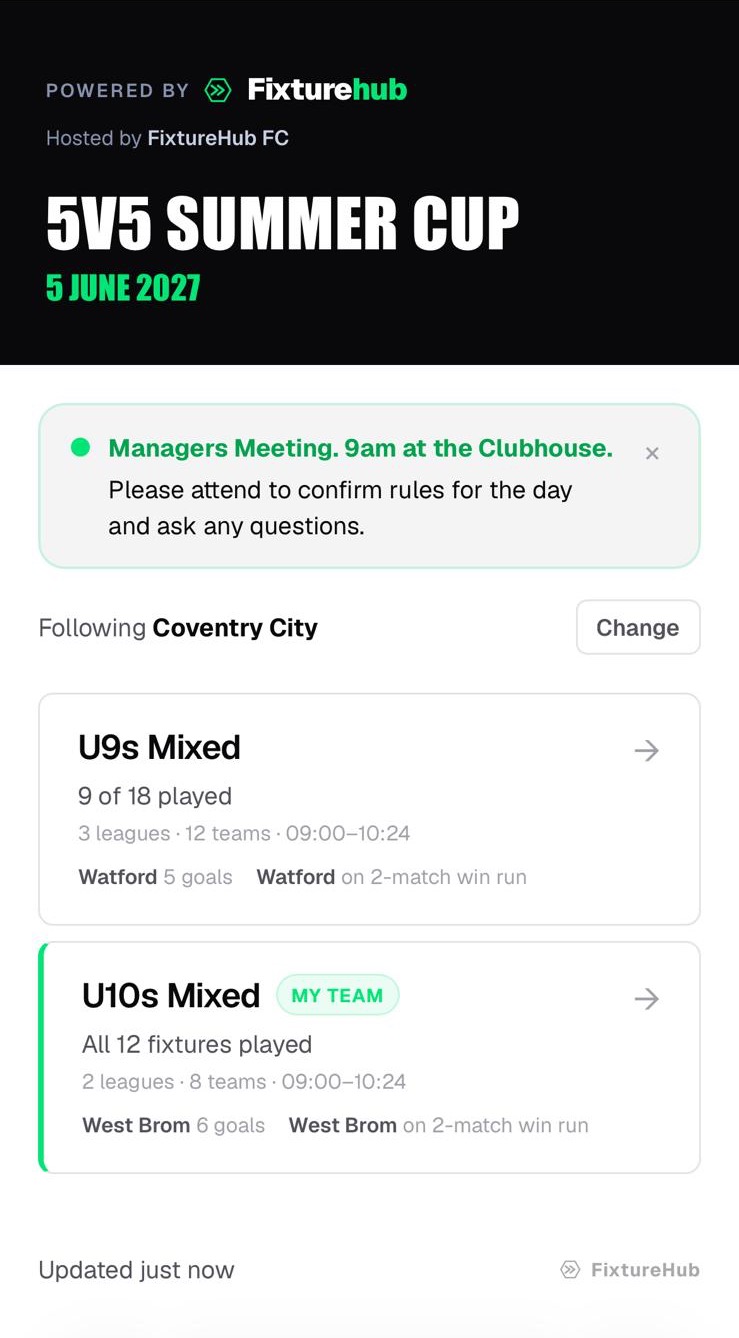
Matchday Announcements
Send updates to the public hub in under 30 seconds.
← swipe →
The score tent stayed quiet, the clearest sign that everyone knew what was going on.
Best of all, parents used the team finder tool once in the morning to bookmark their team, and watched that single page all day.
See the real Dussy Cup 2026 tournamentThe playbook
4 Rules for Keeping the Score Tent Quiet
A quiet score tent is the real marker of a well-run day. It means the touchlines are informed and the desk isn't getting overwhelmed.
What Nobody Tells First-Time Organisers
Running a tournament takes dozens of hours of organisation, relying entirely on the goodwill of parents and club volunteers.
Start early: lock in your volunteers and referees early, and announce the event date before families book other weekend plans. Get every manager in the club promoting it.
The last hour is the hardest: long after the final trophy is handed out and everyone has gone home, someone still has to take the goals down and do a final sweep of the fields for rubbish.
Keep your score tent this quiet next time
The job inside the score tent is demanding enough. The goal is simple: keep matches on time, keep touchlines informed, and make sure the volunteers running the desk actually get to enjoy the weekend.
Create your tournament →